Welcome to the Oyster Academy
Oyster has always been and will always be remote. With team members in 60+ countries, we've learned what good remote work looks like.
This playbook shares the best of what we know about how to thrive as a remote worker.


Working across borders?
Trying to get hired by a company outside your country, or move country with your current company? Oyster can help. Ask your HR team to request a demo here.
This playbook covers everything you need to thrive as a remote worker: setting up your workspace, designing your schedule, protecting your wellbeing, and building meaningful connections across time zones. Based on Oyster's experience working across 60+ countries, it's packed with tactical advice you can use immediately.
What's Important
Part 1: Getting Set Up
Create a workspace and tech setup that supports focused, sustainable work.
Part 2: How to Work
Design your schedule, use your calendar intentionally, and communicate clearly.
Part 3: Protect Your Wellbeing
Set boundaries, spot burnout early, and build rituals that help you recharge.
Part 4: Collaborate and Connect
Work well with others, build relationships, and reduce isolation as a remote worker.
Part 1: Getting Set Up
Your setup is the foundation of your remote work life. It’s what makes focused work, clear communication, and long-term health possible.
In this part, you’ll cover:
- How to set up your physical space
- The equipment that makes remote work easier
- How to work from different locations
- How to stay safe and secure online
Set Up Your Workspace
Your workspace can make or break your productivity. Whether it's a kitchen table or standing desk, you need to find a space that gives you focus, comfort, and the ability to attend meetings without disruptions.
Your workspace can make or break your productivity. It doesn’t have to be perfect, but it does need to help you focus, stay comfortable, and join meetings without constant interruptions.
What works:
- Create a dedicated space
- Even a corner is enough. Use the same spot consistently so your brain learns, “This is where work happens.”
- Minimize distractions
- Close doors, use noise-cancelling headphones, or choose hours when your space is quieter. One Oyster parent uses a “Mummy at work” sign so family knows not to interrupt.
- Get ergonomic
- This matters more than it might seem. Aim for:
- An adjustable chair
- A desk at the right height
- A screen at eye level
- Back and neck pain build up over time. It’s much easier to prevent than to fix.
- This matters more than it might seem. Aim for:
- Make it yours
- Add plants, photos, good lighting, or a small object you love. You’ll spend hours here every week—make it somewhere you actually want to sit.
Get Your Technology & Equipment Right
In remote work, no technology = no work.
You can have the perfect workspace, but if your internet's broken or your laptop's not working, you're basically just sitting at a nice desk doing nothing.
Here are the essentials most people need:
- Reliable internet
- If your connection cuts out often, it’s worth upgrading or switching providers.
- Quality headset or earphones
- Choose something comfortable that lets you hear clearly. Noise-canceling is helpful if you’re in a busy space. Your teammates will thank you when your neighbor starts drilling.
- External monitor
- Even one extra screen can make a big difference. Keep it at eye level to reduce neck strain.
- Good lighting
- Face a window, or use a lamp or ring light in front of you (not behind). Good lighting helps your colleagues see you and is especially useful if you record videos.
- A clear microphone
- Built-in laptop mics often sound muffled and pick up background noise. A USB mic or a quality headset mic makes your voice much easier to understand.
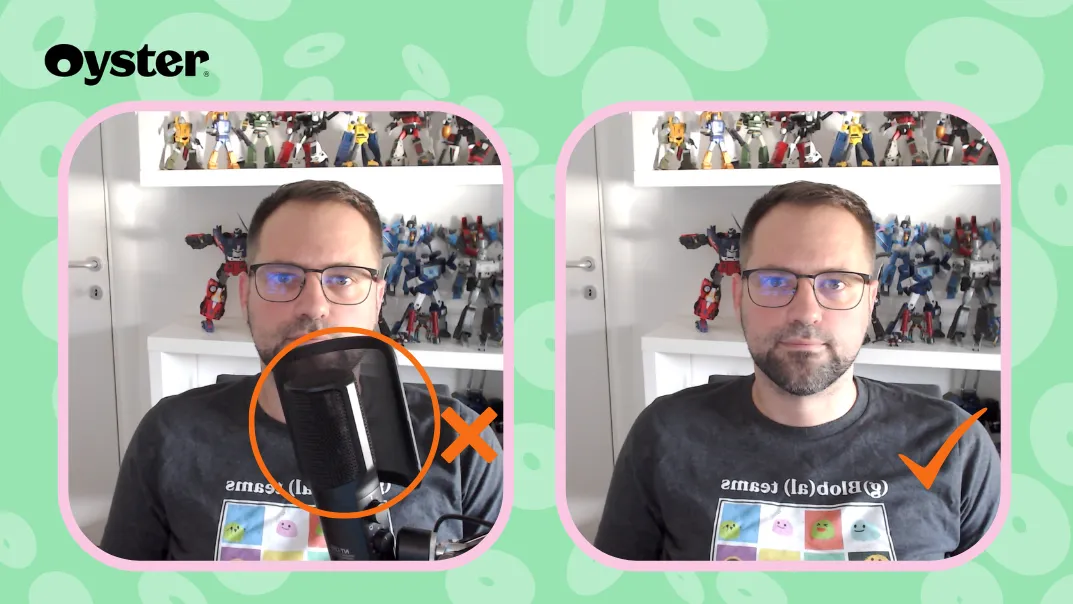
Nice-to-haves that often pay off:
- Backup power
- Keep your laptop charged. If you live somewhere with power cuts, a small battery backup for your router can keep you online.
- Webcam upgrade
- If your laptop camera is grainy or at an odd angle, a separate webcam can help.
- External keyboard and mouse
- These are essential if you work on a laptop for long stretches—they improve both comfort and posture.
How Oyster does it:
At Oyster each employee gets an equipment stipend. New team members prioritize ergonomic chairs, quality headsets, and external monitors first. We've learned that investing in the basics early prevents expensive problems later, like chronic back pain from working on a sofa for months.
Work From Anywhere
Remote work isn't just home. You can work from cafes, co-working spaces, or while traveling.
✅ Check for power outlets and reliable Wi-Fi
✅ Find comfortable seating (your body will thank you)
✅ Consider a portable monitor if you're used to dual screens
✅ Choose places that inspire you
What we've learned from Oyster’s digital nomads:
Research visa requirements, cost of living, and time zone overlap with your team before traveling long-term. Several Oyster team members have traveled while working. Planning ahead with your manager and your team should be as important as planning your travel and accommodation!
In short, if you’re planning to travel while working:
- Research visa rules and any work-related restrictions
- Look into cost of living
- Check time zone overlap with your team and customers
- Align plans with your manager and team before you book travel
Be Safe and Secure
As with any type of work, as a remote worker you are responsible for protecting company information:
✅ Use a VPN if your company provides one, especially on public Wi-Fi
✅ Use a password manager (like 1Password or Bitwarden) instead of reusing passwords
✅ Lock your screen every time you step away, even at home
✅ Enable two-factor authentication on all work accounts
✅ Never leave your laptop unattended in public spaces
Part 1 Checklist: Getting Set Up
- I have a dedicated, ergonomic workspace
- I've got my equipment sorted (charger, monitor, headphones)
- I've got great internet connection (and a backup!)
- I've identified some interesting alternative workspaces (with wi-fi!)
- I've reviewed and implemented my company's security policies (VPN, 2FA, password manager)"
Part 2: How to Work
Compared to traditional office work, remote work can often give you more control over how you structure your working day.
Design Your Work Schedule
Your schedule can make or break remote work. There's no single "right" schedule, but there are patterns that work.
Here's what actually works: Design your schedule in 3 steps
Step 1: Understand when your work needs you
Before you can design your ideal schedule, you'll need to understand any constraints your role has.
Ask yourself (and your manager):
- Are you in a customer-facing role with specific hours you need to cover?
- Do you need to work in a specific time zone to overlap with your team or customers?
- Does your role require you to be available during certain core hours?
- Are there specific meetings or events you need to attend each week?
Step 2: Identify your personal non-negotiables
Get clear on the personal commitments that aren't flexible.
Examples:
- School pickup or drop-off
- Caring for a parent or family member
- A gym class or workout routine you're committed to
- Medical appointments
- Religious or cultural practices
Step 3: Design your working hours
Now you can design when you'll start and finish work, balancing your role needs, personal commitments, and when you do your best work.
Ask yourself:
- Are you an early riser who does best work in the morning?
- Do you prefer working later into the evening?
- Are those preferences compatible with when your team needs you to be available?
- Can you work split hours if needed (e.g., morning block, break, evening block)?
Common schedule patterns we've seen work:
We've seen team members across 60+ countries experiment with everything. Here are patterns that work:
Early bird schedule: 7am-3pm
Perfect if you need to finish in the afternoon and your team can accommodate morning-heavy collaboration.
Night owl schedule: 12pm-8pm
Great for late starters who want to work into the evening and have team overlap in afternoon/evening hours.
Split schedule: 9am-3pm, 8pm-10pm
Works for parents who need to do morning and afternoon school runs and are comfortable catching up with work in the evening.
Compressed schedule: Longer days Mon-Thu
Protects Fridays for personal time or part-time work arrangements. Requires team buy-in and clear boundaries.
Traditional schedule: 9am-5pm
Works when your team is in similar time zones and you have no personal constraints that require flexibility.
Your schedule design template:
Use this to map out your schedule:
- Role constraints: [e.g., customer calls 2-5pm EST, weekly team meeting Tuesdays 10am]
- Personal non-negotiables: [e.g., school pickup at 3:15pm, gym Mon/Wed/Fri 6-7am]
- Peak productivity time: [e.g., mornings for deep work, afternoons for meetings]
- My working hours: [e.g., 7am-3pm GMT with 1-hour lunch break]
What works: Protect your schedule with your calendar
Once you've designed your schedule, your calendar is your boundary enforcement tool. Here's what actually works, in order of impact:
📅 Set your working hours and block personal time - Define your working hours in your calendar tool so colleagues know when you're available. Block personal commitments like school pickup, gym, lunch, and appointments. Make these visible—transparency helps prevent scheduling conflicts.
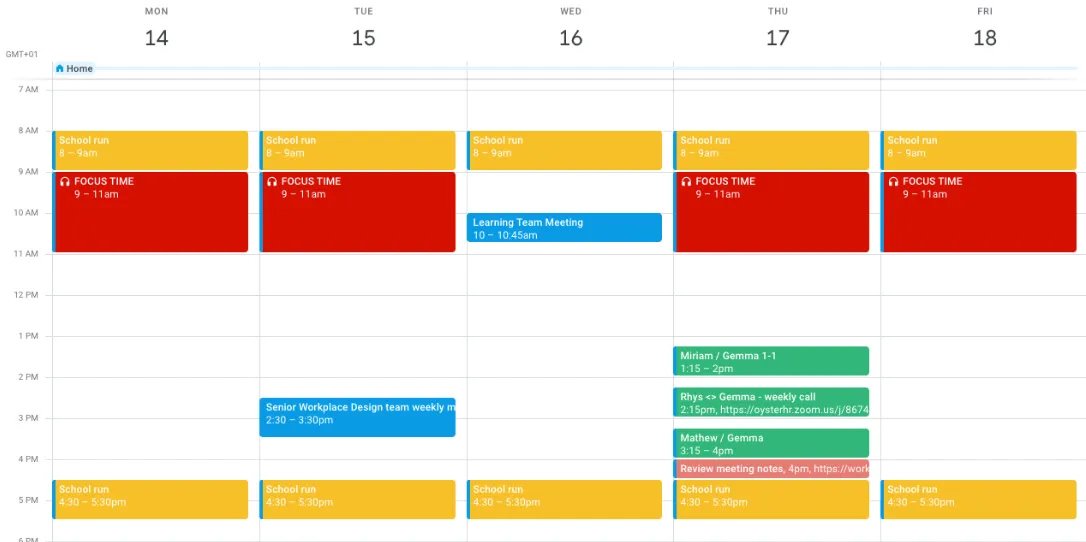
📅 Protect focus time - Block 2-4 hour chunks for deep work. Treat these blocks as seriously as meetings. At Oyster, we encourage employees to block dedicated deep work time so big tasks can be completed without disruption.
📅 Use Out of Office strategically - Set it for days off, long lunches, or appointments so meetings don't get scheduled over them. Auto-decline works better than hoping people will notice.
📅 Communicate schedule changes and respond to invites quickly - If you're travelling or there's going to be a temporary change in your working hours, let your manager and team know ahead of time. Example: "Heads up: I'm working from the family holiday next week, generally online 7am-3pm UTC." Accept or decline meeting invites promptly so organizers can plan. If you need to decline, suggest an alternative time that works for you.
Schedule design checklist:
- I understand when I need to be available
- I've identified my personal non-negotiables
- I know when I do my best focused work
- I've updated my calendar with my working hours
Understanding UTC: Oyster's Time Standard
At Oyster, we have team members in 60+ countries across every time zone. When someone in Sydney says "3pm," that's meaningless to someone in London or San Francisco. This is why we use UTC (Coordinated Universal Time) as our standard.
What is UTC?
UTC is the world's time standard. Think of it as the "neutral timezone" that everyone can convert from. It doesn't follow any daylight saving time and its used in areas like aviation and technology.
How to use UTC:
🕐 Convert from your local time - Most calendar tools show UTC automatically. You can also use timeanddate.com or World Clock on your phone.
🕐 Reference UTC when scheduling - For example, "let's meet at 14:00 UTC”, instead of saying the time in your own timezone.
At Oyster, using UTC isn't optional, it's how we coordinate across the world. You'll see UTC referenced in meeting invites, project deadlines, and team communications. Getting comfortable with UTC conversion is one of the first skills every Oyster team member develops.
Choose the Right Communication
In remote work, communication takes many forms, video calls, messages, documents, emails, and recorded videos. Each method serves a different purpose, and choosing the right one can dramatically impact how quickly work gets done.
For example, scheduling a meeting to make a decision might take days to coordinate, while circulating a discussion document allows everyone to share ideas on their own schedule.
Here's the reality about meetings and remote work:
When you work across time zones, your preference for live discussion can accidentally slow everyone down. If you need to talk through ideas with someone who won't be online for 8 hours, that's 8 hours of delay. But if you share your thinking in a document and tag them for feedback, they can respond on their schedule and the work keeps moving.
Match your communication method to your team's reality, not just your preference.
Two types of communication:
Synchronous (in the moment):
- Video calls (Zoom, Teams, Meet)
- Phone calls
- In-person meetings
- Instant messaging back-and-forth
Asynchronous (on your own time):
- Slack messages (without expecting immediate response)
- Recorded videos (Loom)
- Written documents with comments
- Voice notes
When to use synchronous communication:
Use sync when you need:
✅ Real-time problem solving - Complex technical issues that need back-and-forth debugging or whiteboarding
✅ Sensitive conversations - Performance feedback, conflict resolution, difficult news
✅ Relationship building - Getting to know new teammates, team bonding, informal catch-ups
✅ Urgent decisions - True emergencies that can't wait (these should be rare)
✅ Brainstorming - Generating ideas together works better live, but only when the right people are available
When to use asynchronous communication:
Use async when you need:
✅ Updates and status checks - Share what you've completed, what's next, any blockers
✅ Decisions that need input from multiple people - Post the proposal in a document, gather comments, decide
✅ Non-urgent questions - Most questions aren't actually urgent
✅ Feedback on work - Share a draft document, design, or prototype and ask for specific feedback
✅ Information sharing - Announcing changes, sharing resources, documenting processes
✅ Thinking through complex ideas - Writing forces clarity; share your thinking and let others respond
Oyster's approach: Async-first
Most work happens independently. Meetings are used only when truly necessary. This means:
- People can work on their own schedule
- Fewer interruptions and meeting fatigue
- Better for global teams across time zones
- Decisions happen in hours, not days
- Everything is documented automatically
What this looks like in practice:
💬 Before scheduling a meeting, ask: "Could this be a document with comments instead?"
💬 Before sending a Slack DM, ask: "Should this be in a public channel so others can learn too?"
💬 Before requesting a live discussion, ask: "Is everyone I need actually available right now?"
How to communicate async effectively:
1. Give context, not just questions
❌ Bad: "Can we change the launch date?"
✅ Good: "The vendor delayed delivery by 2 weeks. This affects our launch timeline. I'm proposing we move from March 15 to March 29. Here's what that impacts: [list]. Thoughts by 12pm UTC Thursday?"
2. Be specific about what you need
❌ Bad: "Thoughts on this design?"
✅ Good: "Need feedback on this homepage design by Wednesday. Specifically: Does the CTA placement make sense? Is the hierarchy clear? Any accessibility concerns?"
3. Set a response timeframe
❌ Bad: "Let me know what you think."
✅ Good: "Please review by end of day Friday. If I don't hear concerns, I'll proceed with this approach Monday."
4. Use the right tool for the job
- Quick updates: Slack in relevant channel
- Decisions needing discussion: Document with comment threads
- Explaining something visual: Loom video
- Announcements: Email or Slack to specific channel
- Complex feedback: Written document with tracked changes
When you do need meetings:
Sometimes, a meeting really is the best option. You might choose a meeting when the topic is too complex for async back-and-forth and needs real-time discussion or you need to build alignment quickly among multiple stakeholders.
When you do schedule a meeting, make it count by following the practices below.
Before the meeting:
Share an agenda - What are we discussing? What decisions need to be made?
Include pre-work - Share documents, context, or questions ahead of time so people can prepare
Invite only who's needed - More people = less productive. Keep it small.
Record it - For teammates in other time zones who can't attend
During the meeting:
Start with a check-in - Quick round of how everyone's doing (1-10 scale) builds connection
Use functional emojis - React with 👍 (agree), ❤️ (love this), 🙏 (thank you), ✋ (question) instead of talking over people
Take notes in real-time - Shared doc where everyone can see decisions being captured
End with next steps - Who's doing what by when?
After the meeting:
Share outcomes immediately - Post summary with decisions and next steps in relevant channel
Make the recording or transcript accessible - Link it so people can catch up
How Oyster does it:
Before important meetings, we circulate documents, presentations, or videos in advance, giving participants time to digest the content and do the pre-work. This means when we come together live, everyone arrives informed and ready for discussion.
Adjust your style to your team's reality:
If your team is mostly in one time zone:
You can probably use more sync communication. Quick huddles and live discussions work when everyone's available at the same time.
If your team spans multiple time zones:
Default to async. Live meetings should be rare and carefully scheduled to rotate timing so no one is always stuck with the bad slot.
If you prefer live discussion but your team is distributed:
You'll need to adapt. Write your thoughts in a document first, share it with your team, and use their async feedback to refine your thinking. You'll often get better input than you would in a meeting because people have time to think through their responses.
If you're not sure what your team needs:
Ask your manager: "What's our team's approach to sync vs. async communication? Are there times when one is preferred over the other?"
Communication checklist:
- I know when to use sync and async communication for different situations
- I give context, specifics, and deadlines in my async communication
- When I schedule meetings, I share agendas and pre-work in advance
- I've asked my team about their communication preferences and norms
Part 2 Recap
- I've designed my working schedule with blocked time
- I understand sync vs. async communication and when to use each
- I give context, specifics, and deadlines in my async communication
- I make meetings count by sharing agendas and pre-work in advance
- I've adapted my communication style to my team's reality across time zones
Part 3: Protect Your Wellbeing
When your laptop is your office, it's easy for work to take over your life. After all, its so easy to login and check what’s happening or see a notification on your phone that pulls you back into work.
This part focuses on recognizing burnout early, creating boundaries that stick, and building rituals that help you thrive long-term.
Recognize Burnout Early
When you work remotely, it's sometimes hard to ever feel truly 'away' from work.
High output isn't always a good sign. When its easy to be at work, sometimes its hard to know when to stop. Check how you feel during your working time, if you feel drained you might be working beyond your hours.
Here are common signs to look out for:
- Feeling tired or drained most of the time
- Feeling helpless, trapped, or defeated
- Cynical or negative outlook
- Self-doubt and procrastination
- Taking longer to get things done
If you spot these signs in yourself or a teammate, take action immediately. Burnout doesn't fix itself, it only gets worse.
When to seek support:
Boundaries and rituals help prevent burnout, but sometimes they're not enough. If you're experiencing burnout symptoms, reach out for support.
What to do:
- Talk to your manager - Be honest about how you're feeling. A good manager will work with you to adjust workload or expectations.
- Find out what support is available - Many companies offer Employee Assistance Programs (EAP), mental health resources, or counseling services. Check your company's benefits, speak to your manager or ask your People Department.
- Consider professional help - If symptoms persist, speaking to a therapist or counselor can help. Mental health is health.
- Don't wait until it's critical - The earlier you seek support, the easier it is to recover.
Manage Screen Time & Physical Health
Remote workers face unique physical challenges. Sometimes you’re sitting in the same spot for hours, staring at screens, with no natural breaks that happen in an office environment.
Combat eye strain:
Staring at screens all day takes a toll. Use the 20-20-20 rule: every 20 minutes, look at something 20 feet away for 20 seconds. Set a timer if you need a reminder!
Avoid being still for too long:
In an office, you naturally move between meeting rooms, the kitchen, colleagues' desks. At home, you can go hours without standing up.
What works:
- Get outside daily - Even 10 minutes. Fresh air and natural light improve mood and energy. Walk around the block, stand in your garden, sit on your balcony.
- Change your location - Work from a cafe one afternoon a week, try a co-working space, or just move to a different room. New environments prevent stagnation and boost creativity.
- Schedule movement breaks - Block 5-10 minutes between meetings to stretch, walk, or do a quick exercise. At Oyster, some team members set calendar reminders to stand up and move every hour.
- Consider a standing desk - Alternating between sitting and standing throughout the day reduces back pain and keeps energy levels up. You don't need an expensive setup—a laptop stand on a high surface works too.
Check your posture:
Remote workers often develop neck and back pain from poor posture. Set a daily reminder to check things like:
- Is your screen at eye level?
- Are your shoulders relaxed, not hunched?
- Are your feet flat on the floor?
- Is your lower back supported?
Small adjustments now prevent chronic pain later.
Actually Take Time Off
Remote workers struggle with taking time off more than office workers. When your laptop is always there, it's tempting to check in. But time off isn't optional—it's essential for avoiding burnout.
Use your vacation days:
Don't let them accumulate. Plan time off in advance, even if you're not traveling. Time at home to rest, pursue hobbies, or spend time with family is just as valuable.
“Remote workers took 5.5% less vacation time than non-remote workers” - Gusto, 2023
Protect your time off:
Once you've booked time off, actually disconnect. Here's what works:
🚫 Turn off work notifications - When you're off, you're off. Set Slack and email to Do Not Disturb.
🚫 Delete work apps from your phone temporarily - Or move them to a folder you won't accidentally open. Out of sight, out of mind.
🚫 Set up Out of Office - Auto-decline meetings and set an autoresponder with who to contact in your absence. This removes the temptation to check in.
🚫 Plan coverage - Document what needs to happen while you're away and who's covering it. This removes guilt about being unavailable.
🚫 Tell your team - Give advance notice so work can be planned around your absence.
Working across timezones? Don't feel bad about blocking work during your evening. Your colleagues need to plan around multiple time zones.
How Oyster does it:
At Oyster, we actively encourage people to take their full vacation allowance. We've learned that well-rested team members do better work, make better decisions, and stay with the company longer. Time off isn't a luxury, it's necessary.
Build Healthy Rituals
One of the most valuable things we've learned at Oyster is to create structure around your working schedule that signals when you are in and out of work.
Just as a commuter’s journey to work signals the start of their day, remote workers need activities that signal when work starts and ends.
Morning rituals:
- Make a specific drink that signals work is starting
- Take a "commute" walk around the block
- Post a good morning in your team channel
End-of-day rituals:
- Reflect on what you accomplished
- Create priorities for tomorrow
- Create a firm end time (appointment, school pickup, workout)
Health rituals:
- Block lunch breaks in your calendar and honor them
- Schedule walks or exercise between work sessions
- Keep water and healthy snacks at your desk
How Oyster does it:
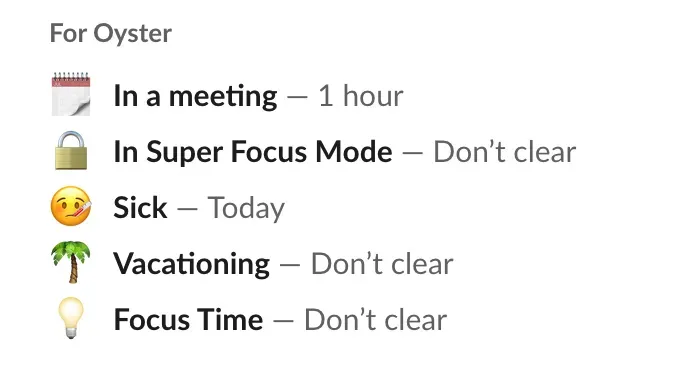
Oyster's use their Slack status to signal when they are in and out of work.
Holidays, illness, caring responsibilities all commonly feature next to the names of our Slack colleagues. Each status signals to others what you're doing, but it also signals to you. When you set a holiday status on Slack and then look at your phone, seeing that status serves as a reminder: you're off. Hopefully, it stops you from reading those messages!
Part 3 Recap
- I can recognize early signs of burnout and know when to seek support
- I check my posture and take movement breaks throughout the day
- I actually use my vacation days and protect my time off by disconnecting fully
- I have morning and end-of-day rituals that signal when work starts and ends
- I use my Slack status to communicate when I'm available or away
Part 4: Collaborate and Connect
Remote work requires intentional effort to build relationships and collaborate effectively.
This part shows you how to connect across time zones. Helping you to build working relationships across your company, and combatting the isolation that can sometimes come with remote work.
Fully remote employees are also more likely to experience loneliness (27%) than hybrid (23%) and on-site workers (21%). - Gallup's State of the Global Workplace: 2025 Report
See Connection as Work
Understanding what's happening across the company and meeting people that you work with, isn't a distraction from work, it's how you stay aligned and make better decisions.
You can't rely on by-chance meet up in the corridor or lunch conversations to build relationships remotely. It requires intention.
Why connection matters for remote work
When you know people across the company, you:
- Get better answers faster (because you know who to ask)
- Understand context for decisions (because you've heard the conversations)
- Feel invested in outcomes (because you know the people affected)
- Spot opportunities to collaborate (because you understand what others are working on)
- Have support when things get hard (because you've built real relationships)
What we've learned the hard way: Remote workers who don't intentionally build connections often feel isolated within 3-6 months, even if they're productive. The work gets done, but without relationships, people don't stay engaged long-term.
How Oyster does it:
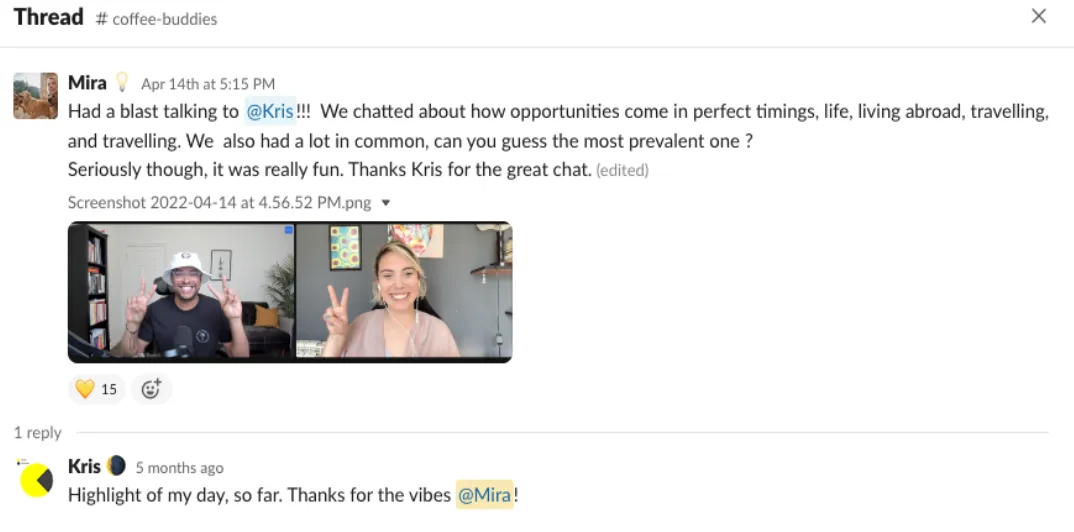
We encourage our poeple to have a weekly video calls with colleagues as part of their work time. You can book a call with anyone in the company, as part of a group or as a one to one. No agenda, just chat.
Who to Connect With
When you're remote, you need to be strategic about building your network.
Here's who matters and why:
Your manager
Weekly 1:1s aren't just status updates. Use them to understand priorities, get coaching, and share what's blocking you.
Your team
These are your first line of support. Schedule informal chats, not just project meetings. Sometimes when you work together, you don’t make time for the around work conversations. Take time to get to know them as well as working with them.
People in different teams
Pick colleagues you'd never randomly bump into. Meeting with these people breaks down silos and helps you understand different perspectives.
Your company might have a pairing tool that assigns you a new person to meet. If not, go through your organization chart a pick people who do a job you’re interested in, or live in a country you’ve like to know more about!
People in different timezones
Connecting with colleagues across time zones can be challenging, especially when your working hours don't overlap. You might not be able to have live meetings, but you can still build meaningful relationships. Send a video introduction, send a message with some ‘getting to know you’ questions
Building relationships across time zones takes more effort, but it's worth it. These connections help you understand different perspectives and work more effectively as a global team.
How Oyster does it
At Oyster we have interest channels where you can connect with colleagues that have interests in common.
For example: food, gardening, pets, books, gaming, fitness. If a channel doesn’t exist, start one. Even just sharing photos and reacting with emojis is enough to build connection!
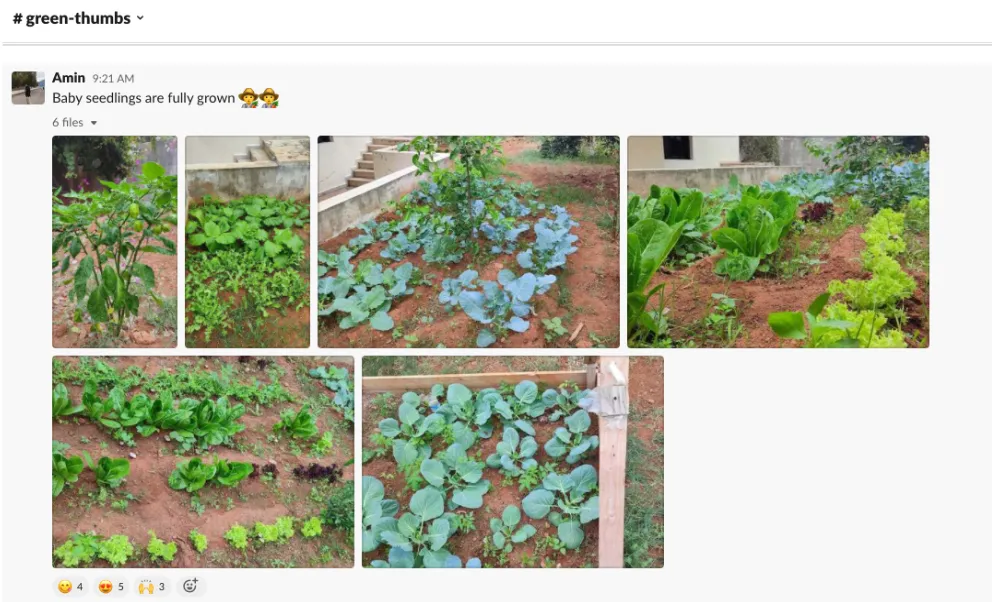
#social-eatsfor food photos and recipes#social-green-thumbsfor gardening#social-petsfor pet photos#social-booksfor recommendation
Top Tips for Building Connection
Building connection remotely doesn't happen by accident. It requires intention and consistency. Here are practical ways to build meaningful relationships with your colleagues:
Be visible in everyday moments:
💬 Show up in channels - Don't lurk. React to messages, answer questions, share updates. Visibility builds familiarity.
💬 Turn your camera on - Especially in team meetings. Seeing faces builds connection faster than voices alone.
💬 Ask questions publicly - When you ask in public channels instead of DMs, others learn too, and you become known as someone who isn't afraid to ask.
💬 Work in public channels by default - Share work in public channels instead of DMs so people can discover conversations, jump in, and learn from existing threads.
Recognize and appreciate others:
👏 Acknowledge people's work publicly - When someone helps you or ships something, say so in relevant channels. Public recognition builds culture and makes people feel valued.
👏 Assume good intent - Text communication can feel blunt. Assume people mean well and ask clarifying questions if something feels off.
Take initiative:
✋ Reach out first - Don't wait for others to initiate. Send a message, book a coffee chat, ask a question. Someone has to go first, let it be you.
✋ Work from co-working spaces or cafes occasionally - Being around others (even if not talking) can reduce isolation and create opportunities for chance encounters.
✋ Document your work clearly - Use handoffs and clear documentation so others can pick up where you left off. This builds trust and makes collaboration smoother.
Part 4 Recap
- I see connection as part of my work
- I'm building relationships across my team and company
- I'm visible and active in channels
- I recognize others' work publicly
FAQs
I'm new to remote work. Where should I start?
Start with creating a dedicated workspace where you can focus. Then understand your work schedule and when specific activities need to take place. Then think about how you do your best work, like when you need to take lunch, step away from your screen. Everything else builds from there.
I work across multiple time zones. How do I collaborate effectively?
Try to use async communication as much as possible. Use UTC as your time standard. Document everything. When sync meetings are necessary, rotate times so no one is always stuck with the bad slot.
How do I avoid burnout?
Set clear boundaries, like turning off notifications when you finish work and showing when you are done for the day in your calendar. Block time for deep work in your calendar and stick to it. Watch for early warning signs (exhaustion, cynicism, procrastination) and adjust immediately.
I feel isolated. How do I build connection with my colleagues?
Be proactive. Join interest-based channels and participate (even just reacting with emojis). Reach out for virtual coffee chats. Turn your camera on in meetings. Give public recognition. Consider working from co-working spaces occasionally to be around others.
My company doesn't have these practices. Can I still use them?
Absolutely. Start with what you control:
- Design your own schedule and rituals
- Block personal time in your calendar
- Write great handoffs
- Give public recognition
- Reach out to build connection
Many of these practices work whether or not your company has formal remote culture.
What if I prefer working in an office?
That's okay! Remote work isn't for everyone. Consider a hybrid model if available. Some people thrive on in-person interaction and structured environments. The key is finding what works for you.Yes, it’s totally free to create an Oyster account, explore the platform, and access global HR tools and resources. The Oyster fee will only kick in once you’ve engaged a contractor, an EOR team member, or a payroll team member.
About This Handbook
This handbook is brought to you by Oyster, a globally distributed company with team members in 60+ countries. We've learned these practices through years of remote work, and we're sharing them so more people can thrive while working from anywhere.
We believe brilliant people are everywhere, and where you are shouldn't govern what you do. If you're trying to get hired by a company outside your country, or move country with your current company, Oyster can help. Ask your HR team to request a demo here.